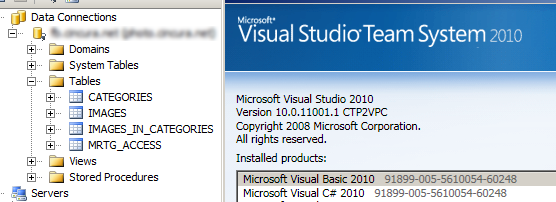
What’s better than finding what you need to fix for upcoming release of product?
I get finally Visual Studio 2010 CTP up and running and decided to test whether DDEX provider for Firebird is working fine with it (else I need to find why not and fix these issues). Luckily it’s working fine. I’ve changed reg files appropriately for VS2010 and modified machine.config for .NET FW 4.0. No problem, 10 minutes and it was done.
Check this out. Nice, isn’t it?
Pingback: Firebird News » DDEX for Firebird and Visual Studio 2010
Hi,
I have installed VS2010 Beta 2. How can I install Firebird DDEX?
Similar way as for VS2008 or VS2005: http://firebird.svn.sourceforge.net/viewvc/firebird/NETProvider/trunk/DataDesignerExtensibility/ReadMe.txt?view=markup .
USING DDEX Instructions
I think I have successfully installed the dll into the GAC
I’m at the step of changing my machine.config
(I have VS2010 beta2)
There seems to be a number of machine.config files on my computer
I have edited each one. None of it makes any difference to my data providers displayed in VS2010
Then you did it wrong (I suppose you did other steps as well). Double check the paths in registry and also proper content in machine.config.
Connected DDEX with vs2010B2. Works fine except for one problem: When i reverse-engineer an entity model from the Firebird 2.1.2 database, all the “fields” in the entity are set as Entity keys. Am using provider 2.5.1. I cleared off all the entity keys setting except the real ones in the entities, but this still causes errors between the mapping of the entity and the table. The table still has all its fields set as key fields.
Anyone have this problem or figure out a way around it?
regards,
http://blog.cincura.net/id/228440/
Hi, Jiri.
Where can I download DDEX for Firebird and Visual Studio 2010 with correct *.reg files and actual installation instructions?
This link is bad http://blog.vyvojar.cz/jirka/archive/2008/11/22/ddex-for-firebird-and-visual-studio-2010.aspx
Thank you.
Sorry.
http://old.nabble.com/attachment/26367435/0/DDEX.7z
and
http://old.nabble.com/VS2010-dat-providers-td26366191.html
As the VS2010 isn’t RTM yet, you have to get the reg files from SVN. When the RTM will be ready, we’ll publish update DDEX package.
http://weblogs.asp.net/scottgu/archive/2010/02/08/vs-2010-net-4-release-candidate.aspx
When should we expect your update DDEX package?
As I said. When the RTM will be ready.
Hi.
So, Jiri, VS2010 is released. When should we expect your update DDEX package?
Thanks.
Soon.
Wonderful. We are looking forward.
reg file is referring to ..VisualStudio\9.0\DataProviders.. it has to be changed to VisualStudio\10.0\.. that’s all.
Same here, the only workaround i found is to right-click the edmx file -> Open With -> XML Editor, and edit tags with correct entity keys. Save. Close. Right Click again and select Run Custom Tool to refresh your Model. you’re done .
Hello, Jiri. We want to start new project using Firebird + WPF + EF 4.0. Can you specify when the package will be released? We really need it. Thanks.
As I said …
BTW the DDEX works with VS2010 fine, you just need to use new *.reg files that are available. The rest is same.
But with current package and *.reg files (http://old.nabble.com/attachment/26367435/0/DDEX.7z) VS2010 wizards and designers are not completely supported, are’t they?
If you use *.reg files in VS2010 directory, everything is simply working (as in VS2008/2005).
I installed the DDEX for Firebird for Visual Studio 2008 and it worked fine. I tried to install it for Visual Studio 2010 and I get the following error every time I try to connection in the server explorer:
Could not load file or assembly ‘[assembly location]‘ or one of it’s dependencies. Operation is not supported. (Exception from HRESULT: 0×80131515)
Same exception (0×80131515) here.
I’m running VS 2010 with Windows 7.
Any ideas?
I’m using DDEX(2.0.5) and VS 2010 with Windows 7 too. Everything is working! Thanks, Jiri.
I finally got it working.
I simply forgot to install the assembly “FirebirdSql.VisualStudio.DataTools.dll” into the gac.
After that everything works fine now.
This assembly doesn’t need to be in GAC.
I installed the DDEX for Firebird for Visual Studio 2010B2 and it worked fine. When MS released the full version of VS2010, I tried to re-install the latest version DDEX for Visual Studio 2010RTM and I get the following error every time I try to connection in the server explorer:
Could not load file or assembly ‘C:\FirebirdDDEX\FirebirdSql.VisualStudio.DataTools.dll‘ or one of it’s dependencies. Operation is not supported. (Exception from HRESULT: 0×80131515)
You’re missing some file(s). Use Process Monitor to see which one(s).
Problem solved Re: 0×80131515 error.
VS2010RTM and DDEX 2.0.5 was re-installed on 2003SP2 server where VS2010B2 and DDEX 2.0.4 was previously. 2003SP2 security was blocking access to the DDEX 2.0.5 DLLs. Once DDEX 2.0.5 DLLs were unblocked, VS2010 with DDEX worked the same as before.
Type your comment here
Exactly the same error here. Works fine in VS2008 but not in VS2010 although the keys in the registry are both made for Visual Studio 9.0 and Visual Studio 10.
@Jacob:
Did you try to register “FirebirdSql.VisualStudio.DataTools.dll” manually into the gac?
(see my post above)
@Oliver:
I understood form post #24 from cincura.net that I didn’t need to do that. But after I installed the assembly in the GAC …it worked as in VS2005/2008. Problem solved. Thanks!
I’ve been doing these for years, and I get get it to work until I too installed the “FirebirdSql.VisualStudio.DataTools.dll” into the gac. It worked in VS 2008 fine, but got the could not load file or assembly message in VS 2010. It works like a charm after that installing into the gac. ???
Unable to generate the model because of the following exception: ‘An error occurred while executing the command definition. See the inner exception for details.
Dynamic SQL Error
SQL error code = -104
Token unknown – line 104, column 17
POSITION
Dynamic SQL Error
SQL error code = -104
Token unknown – line 104, column 17
POSITION
‘.
Altough it’s not DDEX, but EF, related, you’re using too old FB server.
If I drop tables to a Dataset and the Tables have a foreign Key- I always get an Error Message (I translate it here from German, so it may be in english ot exactly the same):
Error merging Objects
Objectlink was not on an Objectinstance
If I remove the Foreign Key everything seems to work!
What todo? Is it a known bug ??
I’m also getting the operation not supported error on FirebirdSql.VisualStudio.DataTools.dll. If I install it to the GAC myself, the connection dialog disappears whenever I try to enter anything. I replaced “%Path%” in the .reg using double backslashes and added everything to the .NET 2 Machine.conf. That should work for VS2010, right? Is there any log to check why it isn’t working?
Same as Matt… after a key press in the connection dialog it disappears. I’m using windows 7 x64.
Mismatch between GAC and machine.config. Follow *exactly* the readme and you’ll be fine.
Solved… just remember to edit the two machine.config (in Framework and in Framework64) because visual studio is a 32bits app…
This error is documented in this post:
http://basaratali.blogspot.com/2010/02/setting-up-firebird-development-with-vs.html
Is the DDEX for Visual Studio 2010 is compatible with Visual Studio 11?
Yes, it should.